The WAV Group study, based on inquiries submitted through Zillow, Realtor.com, and Trulia, found that 48% received no response. A more recent 2024 study reported a nearly identical figure of 47%, suggesting that the problem remains widespread.
On JamesEdition the starting point is different. Inquiries pass through moderation and a blocked-sender list refined over more than a decade, so less of what reaches you is noise.
That’s why every lead deserves a real reply. This guide walks through it step by step: where your leads live, how to reply fast, what to send, how to read a buyer’s profile, and how to track what works.
 Brian MoralesPremier Agent & Orange County Sales Manager, Premier by RedfinAt Premier by Redfin, JamesEdition leads come to our agents by email, and in practice that works well. Ideally, verified leads would also flow straight into our CRM.
When a new lead arrives, we reach out by phone and email. Speed to lead is key: we respond within two to three hours at the latest.
After that, we make at least 10 contact points over one to two weeks, by phone, text and email.
Step 1: Find Your Leads and Set Up Routing
Every lead lands in the Inbox of your Business account.
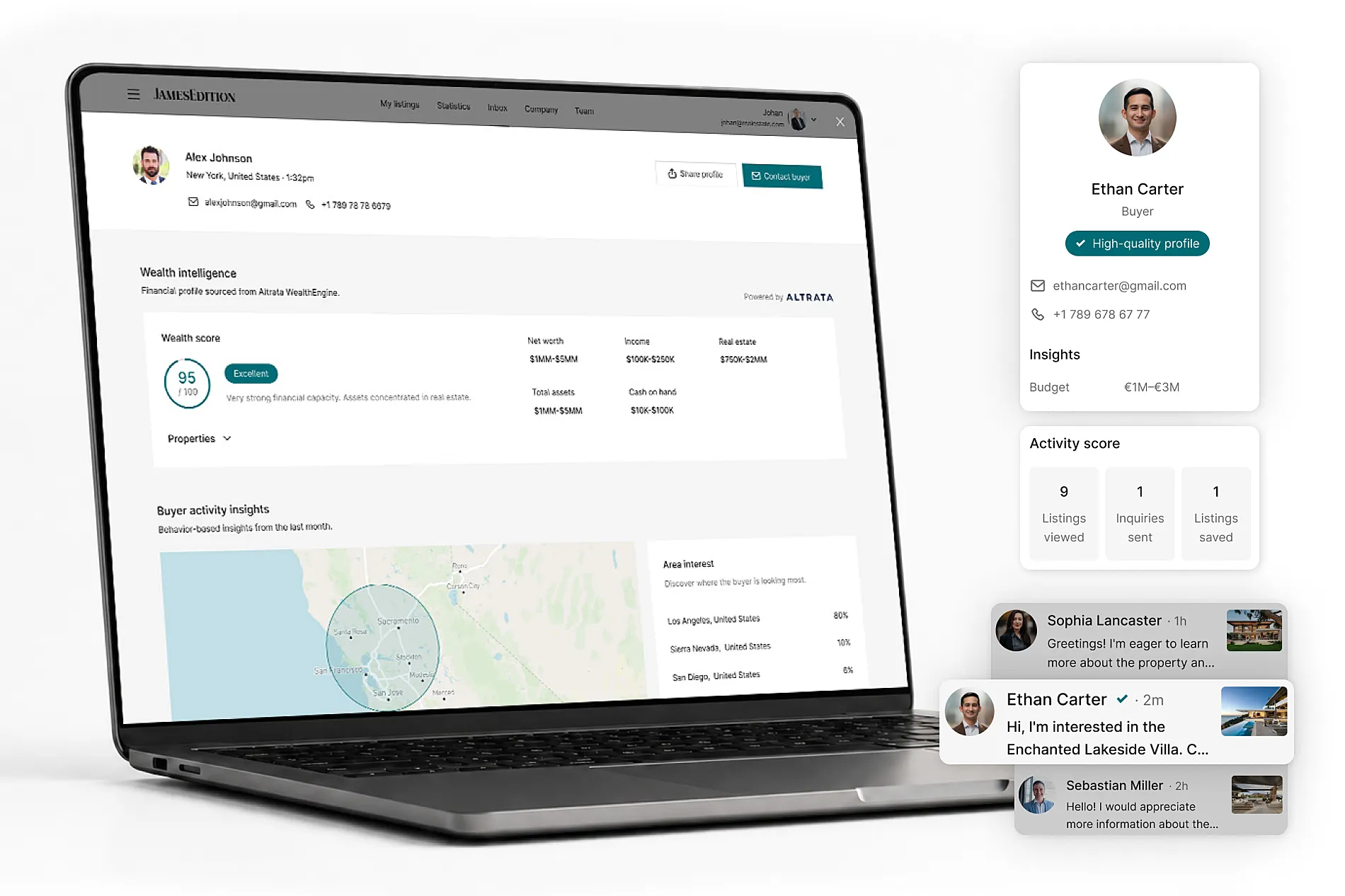
It also goes to your account email, and to the assigned agent’s email if one is set on the listing. When you open a message you’ll see the listing, the buyer’s contact details, a reply field, and the buyer profile next to it.
Buyers choose whether to share a phone number or an email, so leads arrive with one or the other.
Set this up once so every lead is captured and reaches the right person:
- Add a secondary email in your Business account settings to manage leads in one place.
- Route leads to your CRM or lead-tracking system, so every inquiry is logged and followed up.
- Assign an agent to each listing, so the lead reaches the right person by email from the start.
Share with your tech team: Our lead API
If you work with developers, we also offer a lead API that pushes every inquiry straight into your own systems. Share it with your tech team — they’ll find your token in the Business Dashboard.
Step 2: Read the Lead
Over a recent 90-day period, about a third of inquiries came with a written message. The rest reached you as an action on the listing, such as a floor-plan request or a click to call.
An inquiry without a message still carries real intent; the buyer took a faster route to reach you. To understand who they are, use the buyer profile shown next to every inquiry.
It gives a directional read on their financial capacity, the locations and property types they’re exploring, and how actively they’re searching, which is enough to decide who to call first and what to lead with.
Step 3: Reply Fast, by Phone and WhatsApp
Speed to lead decides who gets the conversation. Buyers often inquire on several listings at once, and the first agent to respond sets the pace. Aim to reply within an hour, within minutes where you can.
The research is unambiguous: a lead contacted within five minutes is 21 times more likely to be qualified than one contacted after 30 minutes (MIT / InsideSales.com Lead Response Management Study, 2007).
Harvard Business Review’s audit of 2,241 companies found that firms responding within an hour were 7 times more likely to have a meaningful conversation with a decision-maker than those that waited just 60 minutes longer — yet the average business took 42 hours to respond, and 23% never responded at all (The Short Life of Online Sales Leads, HBR).
That said, be mindful of your buyer’s time zone. A response that lands in the middle of their night works against you, so time your calls to their local hours.
Two channels help you move quickly:
- Phone. After a buyer logs in or enters their email, your number is revealed. On mobile it opens as a direct dial. The inquiry is still saved in your Inbox with their details, and every phone lead includes at least a name and email.
- WhatsApp (Elite and Elite Plus, mobile only). In your Settings, add a phone number linked to an active WhatsApp account with the correct country code, for example +34 for Spain or +39 for Italy. The WhatsApp button then appears on your listing for mobile buyers. When a buyer messages, you get a notification to accept the lead, and a private chat opens. The inquiry routes to the assigned agent’s WhatsApp number, or to your account number if no agent is set. If you don’t reply on WhatsApp, the lead stays in your Inbox with a copy by email, so you can reach the buyer another way.
 Elena FleckPremier agent, Premier by RedfinOur JamesEdition business account dashboard helps us better understand and manage leads coming through the platform. In the dashboard, the pageview breakdown by country and state has been extremely useful. It shows us where our marketing is working and where our buyers are most likely coming from.
Step 4: Track Your Leads and Improve
Open the Statistics tab in your Business account.
Choose any date range or all-time, and view data by day, week, or month. You’ll see:
- Page views, saves, Business Page clicks, and leads and calls.
- Lead Value — the average and total value of the leads you received.
- Average view time and views by your top five countries.
- Top-performing listings by views, saves, and leads.
Put your buyer nationality data to work
Your back office shows exactly which countries engage most with your listings. That’s insight you can feed straight into your marketing strategy, or use to double down on the markets already showing the strongest interest.
- Drill into any single listing and export its report as a CSV.
- If you manage several offices, use the Master Business Dashboard to bring performance across all of them into a single view.
- Review your numbers monthly: watch your response rate and how many leads turn into viewings, and change one thing at a time.
Give your best listings a bigger stage with editorial features
For your best-performing listings, a newsletter feature or social media post can extend that momentum to a much wider audience.
Reach out to your sales contact to get one scheduled.
Step 5: The Multi-Touch Approach to Better Real Estate Lead Conversion
A few habits separate the agents who convert from the ones who don’t. Here’s what works, and what to avoid.
Persistence beats talent
Most leads go cold for one reason — the agent stopped too early.
Research by XANT, an enterprise sales-engagement platform, analyzed roughly 30 million contact attempts. They found that making 7+ attempts yields around 15%+ connections, yet 81% of sellers stop at 5 or fewer.
Build a cadence of five or more touches across multiple channels — email, phone, WhatsApp — spaced over several days before you write a lead off.
Do / Don’t
Do
- Reply within the hour — within minutes where you can.
- Open with one qualifying question, an offer of a call or viewing, and a personal tone.
- Follow up at least five times, across email, phone, and WhatsApp.
- Read the buyer before investing time — use the buyer insights dashboard (activity score, price focus, area interest) to gauge intent.
Don’t
- Don’t let a lead sit for 24 hours “until you have time.”
- Don’t open with a hard sell or a long questionnaire.
- Don’t give up after one unanswered message.
- Don’t treat every lead the same — let the signals tell you where to focus.